
How to buy on Bitrefill without losing money in transit
The purchase itself takes ninety seconds. The two decisions that matter — which region and which network — take ten seconds each and are the only reason people end up with a useless code or a payment that vanished. Here is the whole sequence, in order.
Not the official Bitrefill website.
Before you start: three things to have ready
- Crypto in a wallet you control
- Not on an exchange you will need to withdraw from mid-checkout, because the withdrawal itself takes time the rate window may not have. Move funds to your own wallet first.
- The account you intend to spend on, open in another tab
- You need to know its registered country. Guessing this is the single most common way to buy a code that will never redeem.
- A password manager, open
- The code appears once on screen. Having somewhere to paste it immediately turns a time-sensitive secret into a stored one.
If you do not hold crypto yet, treat that as a separate errand rather than something to sort out mid-checkout: buy a small amount on a regulated exchange with a card or bank transfer, then send it to your own wallet. Trying to do it while an invoice is counting down is how people miss the rate window.
The six steps, in order
-
Decide what you are buying before you open the shop
Gift card, mobile refill, eSIM data plan, bill payment and prepaid card are five different products with different rules. A gift card gives you a code. A refill applies credit to a phone number you type in and cannot be undone. An eSIM gives you a QR code tied to a device. Knowing which one you want removes half the mistakes.
-
Match the country to the account, not to yourself
The country selector at the top of the official site filters the catalogue. What matters is not where you live but where the account you will redeem on is registered. A German Steam account needs the EUR product; a US Amazon account needs the amazon.com product. Codes are region-locked and a mismatch is not refundable.
-
Set the amount, then read the delivery line
Fixed denominations are common; some brands accept a custom value. Below the amount, the product page states how delivery happens — instant code, code within minutes, or credit applied to a number. If it says the balance is applied to a phone number, triple-check that number now, because there is no recovery afterwards.
-
Choose the payment rail deliberately
Lightning for small amounts, a low-fee stablecoin chain for larger ones, on-chain bitcoin only when you have a reason. The checkout locks an exchange rate for a limited window, so a rail that settles in seconds is not a luxury — it is what keeps your order from being repriced.
-
Copy the exact amount and the exact network
Two values matter: the amount and the chain. Use the copy button rather than typing, and if your wallet offers to deduct the network fee from the amount being sent, turn that off. An order short by even a few sats stays unpaid until someone intervenes manually.
-
Pay, wait for the confirmation screen, then store the code
Lightning confirms almost instantly; on-chain payments wait for a block. When the code appears, move it into a password manager immediately, then redeem it at the retailer the same day. Do not leave the only copy sitting in an email inbox.
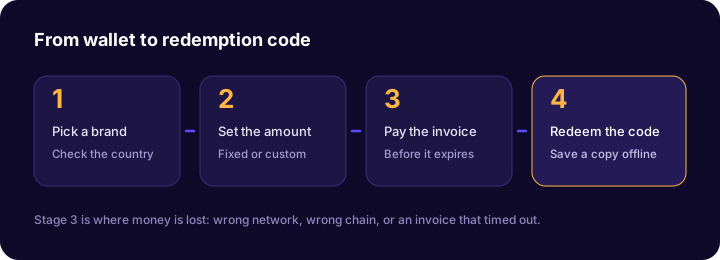
The network mismatch problem, stated plainly
A token and a network are two separate choices. USDT on Tron and USDT on Ethereum share a name and nothing else. Sending one to an address expecting the other means the funds land on a ledger nobody is watching, and no merchant on earth can reverse it.
Before you approve any transaction: read the network on the invoice, read the network selected in your wallet, and confirm they are the same word. If the invoice says Lightning, you need a Lightning-capable wallet — an on-chain bitcoin transaction cannot pay a Lightning invoice.
| The invoice says | You need | A payment that will silently fail |
|---|---|---|
| Lightning | A Lightning wallet paying the full invoice string | An on-chain bitcoin transaction |
| Bitcoin (on-chain) | A normal BTC send with a fee high enough to confirm soon | A Lightning payment, or BTC sent from a Lightning-only balance |
| USDT (TRC-20) | USDT on the Tron network | USDT on Ethereum, BNB Chain or Solana |
| USDC (Solana) | USDC on Solana, with a funded SOL balance for fees | USDC on Ethereum or Base |
| Ethereum | ETH on Ethereum mainnet | ETH on an L2 such as Arbitrum or Optimism |
What to do if a transaction gets stuck
This happens most often with on-chain bitcoin during a fee spike. Your transaction is broadcast, visible in the mempool, and going nowhere because you attached a fee that was competitive twenty minutes ago and is not now.
If the order is still within its rate window
Use replace-by-fee if your wallet supports it. Rebroadcasting the same transaction with a higher fee is a normal operation and does not create a second payment. If your wallet does not support it, wait — most transactions clear within an hour once the fee market settles.
If the rate window has already closed
Do not send a second payment. The first one will still arrive; a second creates an overpayment that has to be resolved manually. Contact support with the transaction ID and the order number. Orders that arrive late are typically either repriced or refunded, and both outcomes are better than paying twice.
If the amount arrived short
Almost always caused by a wallet deducting its network fee from the amount you entered rather than adding it on top. The order will sit unpaid. Support can usually resolve a genuine underpayment on the same chain, so send the order number and transaction ID rather than improvising a top-up payment.
Send a tiny test payment the first time you use a new wallet and network combination. The cost of learning that a chain is wrong is a few cents on a test and the whole order on a real purchase.
Redeeming the code, per product type
The code is a product of the brand, not of the shop. Every redemption happens on the retailer's own property.
- Retail gift cards. Log into the retailer, find the gift card or balance section, paste the code. Balance sits on that account until spent.
- Gaming credit. On Steam it is Activate a Product on Steam in the account menu; other platforms use similar wording. Our Steam guide covers the regional currency trap in detail.
- Mobile refills. Nothing to redeem — the credit was applied to the number you entered at checkout. Verify the balance on the phone.
- eSIM plans. Scan the delivered QR code with the device that will use it, and keep the activation details, since some eSIM profiles can only be installed once.
Questions people actually ask
How long does an order take?
Lightning and stablecoin payments typically produce a code within a minute. On-chain bitcoin waits for a network confirmation, which is anywhere from ten minutes to over an hour depending on the fee you attached and how busy the mempool is. Delivery of the code itself is near-instant for most gift card brands once payment is detected.
What if I paid but the order still says pending?
Check three things in order: did the transaction actually broadcast, did it go out on the network the invoice expected, and did the full amount arrive. Most stuck orders are a slow confirmation and resolve on their own. If the amount arrived short, or on the wrong chain, contact support with the transaction ID and do not send a second payment.
Can I cancel or refund a gift card?
Once a code has been revealed, no. That is standard for the entire gift card industry, because the code is a bearer instrument — revealing it is equivalent to handing over cash. Orders that failed before delivery are a different matter and can be resolved with support.
How do I use a Bitrefill gift card code?
On the retailer's own site or app, never on the shop you bought it from. Look for redeem a gift card, add balance or activate a product in the account area, and paste the code. The balance then belongs to that retailer account.
Is a hardware wallet a problem for this?
Not a problem, just slower. The risk with a hardware device is that its send screen is deliberately minimal, so it will not warn you about a chain mismatch the way a modern smart wallet might. Verify the network on the invoice before you approve on the device.
Nobody legitimate ever needs your seed phrase or private keys — not a shop, not support, not a giveaway. Write those twelve or twenty-four words on paper, keep them offline, and treat any request for them as a confirmed scam.